Amazon OneLink vs Geniuslink: 2026 Cost and Routing
Compare Amazon OneLink vs Geniuslink on eligible markets, link rules, reporting, and cost. Use a click-volume check before changing international routing.
On this page (8)

Amazon OneLink vs Geniuslink is a choice between Amazon's free native redirect and a paid link-management service with broader routing and click reports. The right option depends on the marketplaces you use, the type of links on your site, your need for non-Amazon retailers, and the monthly click cost.
Quick answer: Start with OneLink if your pages use supported Amazon links, your target marketplaces fit Amazon's current country rules, and you want a free option. Consider Geniuslink if its multi-retailer routing, click destinations, and link controls solve a real job for your audience. The Amazon OneLink vs Geniuslink choice should follow your measured routing need, while Associates Central remains the source for Amazon earnings.
| Decision point | Amazon OneLink | Geniuslink |
|---|---|---|
| Service price | Amazon says OneLink is free | Public standard pricing starts at $6 per month for 1,000 clicks, then $3.50 per additional 1,000 clicks |
| Market setup | Amazon lists Canada and EU5 plus seven more markets across its setup paths | Supports linked retailer programs and local routing, subject to each program and account |
| Link handling | Redirects international Amazon affiliate traffic to a local Amazon store, subject to its setup and link rules | Provides managed destination routing; verify each placement and destination |
| Earnings reports | Review Amazon results in Associates Central | Compare service click reports with Amazon earnings in Associates Central |

---
1. Compare the job each tool does
OneLink is Amazon's own geo-redirection feature for Amazon affiliate links. Amazon's OneLink FAQ says it can send international visitors to a local Amazon store and that the feature is free. It remains tied to the Associates account, its supported markets, and its link rules.
Geniuslink is a separate paid service for managing links. Its current pricing page describes local product routing and click reports. Those reports do not replace the sales and earnings information in Amazon Associates Central.
Do not compare the tools only by the word "international." First decide whether the problem is Amazon-only link redirection, managing links across merchants, destination control, or diagnosing click paths. This comparison builds on the Amazon OneLink setup guide, which focuses on configuring Amazon's own feature.
---
2. Check the marketplaces you need
Amazon's OneLink FAQ groups its setup paths into Canada and EU5, which includes the United Kingdom, Spain, Germany, France, and Italy, plus seven additional marketplaces: Japan, Singapore, the Netherlands, Saudi Arabia, Poland, Sweden, and Australia. Review the setup instructions for each market you plan to use and complete its account requirements before expecting commission credit.
For every country in your analytics, record the marketplace, whether you have the right account, the tracking ID, payment setup, and tax information. A reader can be redirected to a local Amazon store, but that does not guarantee a commission if your account setup or the destination program is incomplete.
If your content compares multiple merchants, check each program's application, market, and link rules separately. FindAffiliates profiles can help with research for Walmart, B&H Photo, and Target. A link-management service does not enroll you or confirm a retailer's rates, shipping coverage, or content rules.
---
3. Verify your link formats and placements
Check the current OneLink setup and link rules before changing your site. Link formats can behave differently across websites, social profiles, email, and other placements. Test a representative link from the reader's point of view, then confirm that the final destination still carries the correct program attribution.
The placement matters too. A link on a website, a social bio, a video description, and an email can pass through different systems. Do not assume that a website redirect applies to every social or email link. For each placement, test a representative link from the user's point of view and confirm that the final destination still carries the correct program attribution.
Geniuslink creates managed destination links, but your affiliate account and program policy still determine eligibility and commission credit. Keep the original product URL and the final destination in your test record. Avoid changing every high-traffic link at once.
---
4. Compare destination controls
Amazon's OneLink FAQ says the feature redirects international visitors to their local Amazon website. That describes the destination store, not a guarantee that a particular item is available or identical in every country. Check the destination page, product availability, language, currency, and tracking behavior in each priority market.
Geniuslink offers a separate routing and reporting layer. That can be useful when a publisher needs to review destination choices across more than one retailer. Choose it only when the added controls answer a specific need. More routing options also mean another service, link format, and configuration to monitor.
---
5. Estimate Geniuslink cost from your own clicks
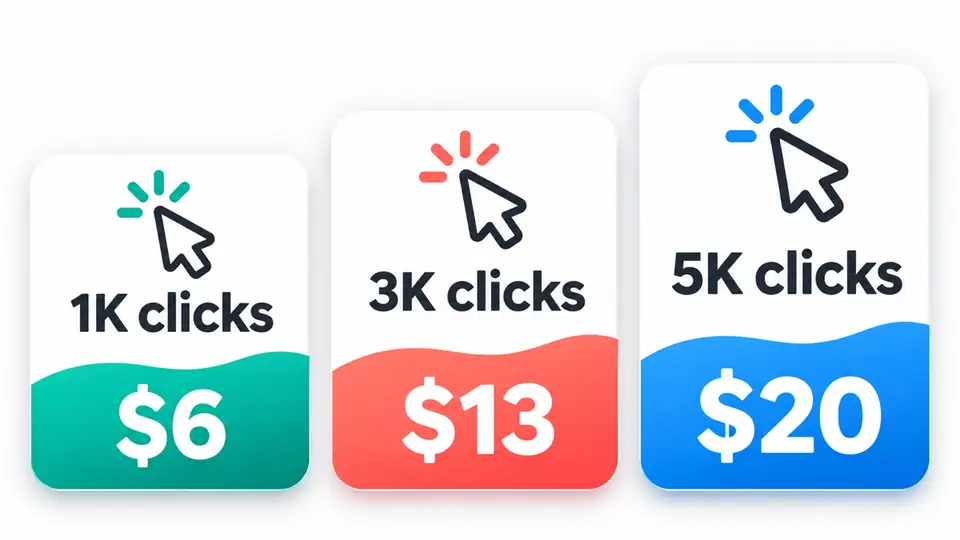
Amazon says OneLink has no fee. Geniuslink currently lists a $6 monthly base price that includes 1,000 clicks, then $3.50 per additional 1,000 clicks at standard rates. Its pricing page gives 3,000 clicks as a $13 example. Volume discounts and optional services can change the final amount, so check the current pricing page and your account before budgeting.
| Monthly billable clicks | Public standard estimate |
|---|---|
| 1,000 | $6.00 |
| 2,000 | $9.50 |
| 3,000 | $13.00 |
| 5,000 | $20.00 |
The table estimates service cost, not additional affiliate revenue. Compare the bill with the value of the routing and reports you actually use. If you do not have enough international or multi-retailer clicks to justify the fee, the free OneLink route may be simpler.
---
6. Keep earnings and click reports separate
Keep router click data and affiliate earnings separate. Compare each link service's routing reports with the order and commission records from the program that owns the final destination. A report of clicks is not proof of a sale.
For market-specific commission questions, compare the Amazon Canada and UK rate guide. For a broader event workflow, use how to track affiliate links and commissions.
---
7. Run a small routing test before switching
Pick a short sample of high-traffic pages and products that matter to different countries. Record the original link, the final destination, the country used for the check, the tracking ID, the product match, and the date. Compare OneLink and Geniuslink only on links that both tools can process as intended.
Confirm the destination is useful, the correct Associates account is attached, and your page still meets each program's rules. If a link performs differently, investigate the market, local product availability, and tracking setup before attributing the result to the link tool.
Save the test sheet with the date and decision. If you keep a paid tool, include the monthly fee and click count in your review. If you keep OneLink, schedule a review of marketplace accounts, redirects, and payment setup. This final check makes the Amazon OneLink vs Geniuslink comparison specific to your audience. Do not remove a working link until its replacement has passed the same checks.
---
FAQ
Is Amazon OneLink free?
Yes. Amazon's current help page says OneLink and its features are free. You still need the applicable Associates accounts, tracking IDs, tax details, and payment setup for the countries you want to monetize.
Does Amazon OneLink guarantee a local product match?
No. OneLink can redirect an international visitor to a local Amazon website, but the product may differ or be unavailable in that marketplace. Test important destinations in the countries that matter to your readers.
Can link clicks estimate affiliate sales?
No. Compare routing clicks with the order and commission records from the affiliate program that owns the destination. Count attributed earnings from the program's records, not the router's click total.
When should an affiliate use Geniuslink instead of OneLink?
Consider Geniuslink when its multi-retailer support, destination controls, or click reports solve a measured need. Compare the current fee with your billable click volume and test a small set of links before changing a larger site.
The practical choice in Amazon OneLink vs Geniuslink comes down to markets, link handling, reporting, and cost. Start with Amazon's free option when it meets the documented need, and pay for managed routing only when its additional work is useful.